Reference
https://www.nexmo.com/blog/2017/01/26/handle-inbound-text-speech-phone-call-node-js-dr/
# Buy a virtual number
First you make a payment (with credit-card/paypal) in order to buy virtual numbers. At least 10 Euro to start.
Here I bought an Indonesia number +628557467xxxx .
# Setup a webserver to receive webhooks.
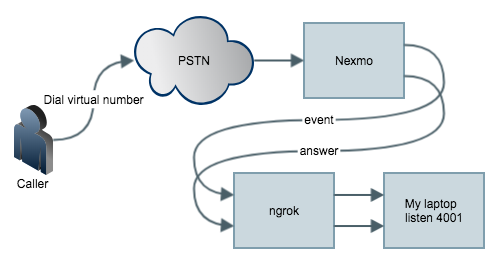
The target is When anyone (from PSTN/GSM) calls your virtual number, Nexmo platform intercepts the call and
sends it to the application you created.
To setup a web server on your laptop to listen the webhook, you can use any web framework.
For me i use
CodeIgniter . Download and unzip it anywhere.
Create a controller named event.php under application/controller with the following
defined('BASEPATH') OR exit('No direct script access allowed');
class event extends CI_Controller
{
public function index()
{
var_dump($_POST);
}
}
and a answer.php like the following,
defined('BASEPATH') OR exit('No direct script access allowed');
class answer extends CI_Controller
{
public function index()
{
var_dump($_POST);
}
}
Then under the same folder, run
>php -S localhost:4001 -t ./
will start a web server listening on port 4001.
Then we setup a ngrok which is an auto registering dynamic https endpoint.
On a macOS laptop, use
>brew cask install ngrok
>ngrok http 4001
For example, you see the following:
ngrok by @inconshreveable (Ctrl+C to quit)
Session Status online
Session Expires 7 hours, 59 minutes
Version 2.2.8
Region United States (us)
Web Interface http://127.0.0.1:4040
Forwarding http://e69a8532.ngrok.io -> localhost:4001
Forwarding https://e69a8532.ngrok.io -> localhost:4001
Connections ttl opn rt1 rt5 p50 p90
0 0 0.00 0.00 0.00 0.00
Now everything is ready on your laptop.
Then we tell Nexmo to send webhook to https://e69a8532.ngrok.io
# Install nexmo command line interface
>npm install nexmo-cli -g
>npm i npm to update
>nexmo setup
Find your application id on the page.
>nexmo app:update "My First App" https://e69a8532.ngrok.io/answer https://e69a8532.ngrok.io/event
>nexmo link:app
# Testing
Call the virtual number like +628557467xxxx from your mobile phone (GSM) or Skype out
and you'll see the variable dumped in php.
[Thu Jul 26 16:41:55 2018] ::1:65010 [200]: /event
[Thu Jul 26 16:41:55 2018] ::1:65011 [200]: /event
[Thu Jul 26 16:41:56 2018] ::1:65012 [200]: /event
[Thu Jul 26 16:41:56 2018] ::1:65013 [200]: /event
[Thu Jul 26 16:42:12 2018] ::1:65017 [200]: /event
[Thu Jul 26 16:42:12 2018] ::1:65015 [200]: /event
[Thu Jul 26 16:42:13 2018] ::1:65016 [200]: /answer?to=628557467xxxx&from=4434xxxxxxxxxx&conversation_uuid=CON-xxxxxxxx-7a9e-426d-961b-828bc7726d49&uuid=93b62d17c960c0209xxxxxxxxxx