6/14/2019

架設公司私有的偽M$ Project - OpenProject篇

繼上一篇 架設公司私有的Yum repository for CentOS 7 又要來教學一篇買不起M$ Projects 怎麼省錢做專案時程管理 ?

WHY?

  1. 專案資料都是私有的,可以升級和擴充其他功能。
  2. 作為技術宅或是小主管當夾心餅乾,老闆要你估工作時程(很多號稱agile其實瀑布式的開發方式),很多時候你還是需要自己快速的粗估一個flow。
  3. 新創公司/小公司/工作室/許多業餘的side-project 都很適合,也可以給人專業感

Install

使用Docker安裝OpenProject (真的只需要一行)


docker run -p 8080:80 -v openproject-db:/var/lib/postgresql/9.4/main -v openproject-data:/var/db/openproject -e SECRET_KEY_BASE=MY012j38adasSECRET openproject/community:8

啟動和運行OpenProject:

預設管理密碼(登錄名:admin,密碼:) admin。然後,啟動瀏覽器http://localhost:8080/ 一般來說為了避免資料建立之後消失, 會用 -v (Volume) 將電腦內的空間掛進去, 這樣docker stop之後資料保持。
網頁登入後馬上就可以看到畫面, 登入之後可以開始建立你的第一個專案。
一般來說要先建立Users 和 Group 並且賦予不同角色。


如果你需要寄email, 例如通知人員開始執行工作包, 新的技術比較偏好用Webhook去通知你的工作IM, 例如Slack。參考官網說明的SMTP配置透過環境變數傳入docker預設情況下,docker容器將嘗試通過本地postfix發送電子郵件 。但是,以這種方式發送的電子郵件很可能會失敗或最終進入用戶的垃圾郵件收件箱。我們建議使用外部SMTP服務器發送您的電子郵件。

一個不錯的選擇是SendGrid,它提供每月最多12000封電子郵件的免費計劃。只需在網站上註冊,審請一個新的API密鑰並將其複製到某個設定(看起來像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)。您也可以使用您的SendGrid用戶名和密碼,但這不太安全。然後,您可以使用以下附加環境變數 (使用SendGrid,SMTP_USER_NAME始終是apikey。只需替換 SMTP_PASSWORD為您生成的API密鑰)

docker run -d \ -e EMAIL_DELIVERY_METHOD=smtp \ -e SMTP_ADDRESS=smtp.sendgrid.net \ -e SMTP_PORT=587 \ -e SMTP_DOMAIN=my.domain.com \ -e SMTP_AUTHENTICATION=login \ -e SMTP_ENABLE_STARTTLS_AUTO=true \ -e SMTP_USER_NAME="apikey" \ -e SMTP_PASSWORD="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" \ ...

您可以為其他SMTP提供程序調整這些設置,例如GMail。

這裡要小心,如果你用GMail,需要產生application password來代替寄信,不能用真實的user密碼(心裡背誦的那個)。

開始第一個scrum project

此處我們嘗試建立一個scrum project 切成2個phase, 第一個phase是功能開發, 第二個phase是管理介面和金流串接。

首先要有人, 所以從Users群組開始添加一些User帳號。這裡添加之後只是產生User帳號, 還必須把他們一一添加到專案中, 才可以在後續的Task assignment將工作包分配給他們。

OpenProject 有很方便的群組管理, 這裡我將潛在的專案成員依照在公司內的組織劃分為RD, PM, SQA測試。
接著在scrum project下面添加的work packages添加工作包。這裡一開始不是很確定在OpenProject內的 Phase, Task, feature, user story的相對關係, 通常來說是Phase包住另外三個。沒關係,等試驗之後再用Gantt Chart打開來看。


用open project可以很容易設定工作包的parent
點下工作包的information, 在右上角可以點一下設定parent。不需要從parent一個一個add child的方式。


反過來如果是初期的工作包展開, 從parent添加子工作包會比較直覺。
添加了一些工作包之後可以切換到Gantt Chart View。這裡暫時只有在第一個工作包下面增加第一個feature, 所以看起來是Phases/Tasks/Features


10/11/2018

Taiwan points exchange rates

當你要推出一個贈送點數的行銷方案時, 是否考慮過可能產生無窮迴圈被用戶洗點數?

台灣紅利點數轉換率一覽 是一個工具
計算台灣各種點數之間的最優交換比率(轉換路徑)。 計算是否有任何迴圈會造成無限增長點數?
利用python networkx的深度優先搜尋算法, 以及graphviz 做出下圖


7/26/2018

Using Nexmo to receive incoming calls


Reference
https://www.nexmo.com/blog/2017/01/26/handle-inbound-text-speech-phone-call-node-js-dr/


# Buy a virtual number

First you make a payment (with credit-card/paypal) in order to buy virtual numbers. At least 10 Euro to start.
Here I bought an Indonesia number +628557467xxxx .

# Setup a webserver to receive webhooks.

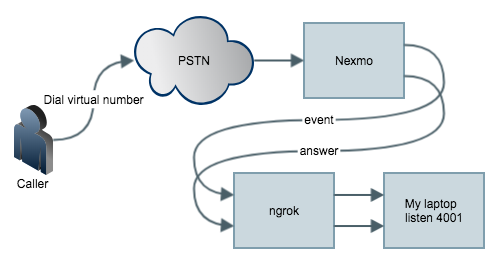
The target is When anyone (from PSTN/GSM) calls your virtual number, Nexmo platform intercepts the call and
sends it to the application you created.
To setup a web server on your laptop to listen the webhook, you can use any web framework.
For me i use CodeIgniter . Download and unzip it anywhere.
Create a controller named event.php under application/controller with the following

defined('BASEPATH') OR exit('No direct script access allowed');
class event extends CI_Controller
{
public function index()
{
var_dump($_POST);
}
}

and a answer.php like the following,

defined('BASEPATH') OR exit('No direct script access allowed');
class answer extends CI_Controller
{
public function index()
{
var_dump($_POST);
}
}

Then under the same folder, run
>php -S localhost:4001 -t ./
will start a web server listening on port 4001.
Then we setup a ngrok which is an auto registering dynamic https endpoint.
On a macOS laptop, use
>brew cask install ngrok
>ngrok http 4001
For example, you see the following:

ngrok by @inconshreveable (Ctrl+C to quit)
Session Status online
Session Expires 7 hours, 59 minutes
Version 2.2.8
Region United States (us)
Web Interface http://127.0.0.1:4040
Forwarding http://e69a8532.ngrok.io -> localhost:4001
Forwarding https://e69a8532.ngrok.io -> localhost:4001
Connections ttl opn rt1 rt5 p50 p90
0 0 0.00 0.00 0.00 0.00

Now everything is ready on your laptop.
Then we tell Nexmo to send webhook to https://e69a8532.ngrok.io

# Install nexmo command line interface
>npm install nexmo-cli -g
>npm i npm to update
>nexmo setup

Find your application id on the page.
>nexmo app:update "My First App" https://e69a8532.ngrok.io/answer https://e69a8532.ngrok.io/event
>nexmo link:app

# Testing

Call the virtual number like +628557467xxxx from your mobile phone (GSM) or Skype out
and you'll see the variable dumped in php.
[Thu Jul 26 16:41:55 2018] ::1:65010 [200]: /event
[Thu Jul 26 16:41:55 2018] ::1:65011 [200]: /event
[Thu Jul 26 16:41:56 2018] ::1:65012 [200]: /event
[Thu Jul 26 16:41:56 2018] ::1:65013 [200]: /event
[Thu Jul 26 16:42:12 2018] ::1:65017 [200]: /event
[Thu Jul 26 16:42:12 2018] ::1:65015 [200]: /event
[Thu Jul 26 16:42:13 2018] ::1:65016 [200]: /answer?to=628557467xxxx&from=4434xxxxxxxxxx&conversation_uuid=CON-xxxxxxxx-7a9e-426d-961b-828bc7726d49&uuid=93b62d17c960c0209xxxxxxxxxx

12/04/2017

Block incoming calls. How to extract offline database from Whoscall


Prepare apk and root phone
Download apk of gogolook whoscall from some website like this.

Install apk to a rooted android phone, I recommend samsung i9001.
A little bit old, but great performance running CyanogenMod. Here's how you can root your i9001

Download offline database
Update offline database following instructions in Whocall app, this will create a database named

Under android /data/data//databases/offline.realm

Use Android studio device monitor tools to navigate to above path,
Click the button (top-right) to "pull file from device"
Save it to your Download folder on your laptop, say whoscall_database

.realm is a client-side database that helps you seamless integrate a sqlitedb and scale-up if needed. Realm database help manage db when gets larger.


Download real browser from above site to your Mac laptop

Open Download/whoscall_database/offlinedb.realm

I'm using a Taiwan number so most of the database are numbers in Taiwan.


Looks like when a call comes in, whoscall is using a hash function to calculate from the phonenumber to a hash value and then search from the offline database for a hit. If so, shows a warning triangle on the lock screen.