
11/21/2021
Solution - UnCrackable App for Android Level 2
See challenge here
Use dex2jar tool to extract source code.
$~/Downloads/dex-tools-2.1-SNAPSHOT/d2j-dex2jar.sh UnCrackable-Level1.apk
Use JD-GUI to review the source code
$java -jar ~/Downloads/jd-gui-1.6.6.jar

Unzip apk to see lib/ folder
$tree lib
lib
├── arm64-v8a
│ └── libfoo.so
├── armeabi-v7a
│ └── libfoo.so
├── x86
│ └── libfoo.so
└── x86_64
├── libfoo.so
If you're a lazy person like me, I use strings first to see if anything comes up.
$strings lib/x86_64/libfoo.so
"Thanks for all t" maybe our flag to capture, but didn't pass entering to the App. Looks like the ending part is missing. So, use Ghidra or IDA free or Hopper Diassembler to see the bar function
Java_sg_vantagepoint_uncrackable2_CodeCheck_bar

some ascii code strings were found at the strncpy.
The second parameter is our flag to capture
"Thanks for all the fish"
Solution - UnCrackable App for Android Level 1
See challenge here
Use dex2jar tool to extract source code.
$~/Downloads/dex-tools-2.1-SNAPSHOT/d2j-dex2jar.sh UnCrackable-Level1.apk
Use JD-GUI to review the source code
$java -jar ~/Downloads/jd-gui-1.6.6.jar

Now we know the check is to check your input String is equal to the hardcoded ciphertext (encrypted by AES).
Write a similar java program copy & paste the function to decrypt the ciphertext without input anything
$javac UnCrackableLevel1
$java UnCrackableLevel1
The secret is "I want to believe"
*** Note the source code use AES/ECB/PKCS7Padding
but actually using AES
2/23/2020
到底應該買房還是用租的?

如果你也是正在成家,這個問題應該也困擾你許久?
當中考慮因素有很多,並不是A或B這種兩分法,例如:
- 生活品質方面:手邊現金不夠用的時候,全家暴露在風險之下,不能生病、也不能出國玩是你要的嗎?。
- 安全感方面:房東往往不會租你這麼久卻不漲租金,至少我們法規保障還不像歐洲對租客那樣友善。被迫搬家除了一筆費用,對小孩換環境的影響也不小。
我這邊整理了一份試算表,你可以依照自己情況填入黃色區域,就能看到逐年的資產增長。
因為不確定你會買在「蛋黃區」還是「泡沫區」房價的漲幅和折舊1.17%沒有估計在內。
(點此)下載試算表
6/14/2019
架設公司私有的偽M$ Project - OpenProject篇
WHY?
- 專案資料都是私有的,可以升級和擴充其他功能。
- 作為技術宅或是小主管當夾心餅乾,老闆要你估工作時程(很多號稱agile其實瀑布式的開發方式),很多時候你還是需要自己快速的粗估一個flow。
- 新創公司/小公司/工作室/許多業餘的side-project 都很適合,也可以給人專業感
Install
使用Docker安裝OpenProject (真的只需要一行)docker run -p 8080:80 -v openproject-db:/var/lib/postgresql/9.4/main -v openproject-data:/var/db/openproject -e SECRET_KEY_BASE=MY012j38adasSECRET openproject/community:8
啟動和運行OpenProject:
預設管理密碼(登錄名:admin,密碼:) admin。然後,啟動瀏覽器http://localhost:8080/ 一般來說為了避免資料建立之後消失, 會用 -v (Volume) 將電腦內的空間掛進去, 這樣docker stop之後資料保持。
網頁登入後馬上就可以看到畫面, 登入之後可以開始建立你的第一個專案。
一般來說要先建立Users 和 Group 並且賦予不同角色。

一個不錯的選擇是SendGrid,它提供每月最多12000封電子郵件的免費計劃。只需在網站上註冊,審請一個新的API密鑰並將其複製到某個設定(看起來像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)。您也可以使用您的SendGrid用戶名和密碼,但這不太安全。然後,您可以使用以下附加環境變數 (使用SendGrid,SMTP_USER_NAME始終是apikey。只需替換 SMTP_PASSWORD為您生成的API密鑰)
docker run -d \ -e EMAIL_DELIVERY_METHOD=smtp \ -e SMTP_ADDRESS=smtp.sendgrid.net \ -e SMTP_PORT=587 \ -e SMTP_DOMAIN=my.domain.com \ -e SMTP_AUTHENTICATION=login \ -e SMTP_ENABLE_STARTTLS_AUTO=true \ -e SMTP_USER_NAME="apikey" \ -e SMTP_PASSWORD="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" \ ...
您可以為其他SMTP提供程序調整這些設置,例如GMail。
這裡要小心,如果你用GMail,需要產生application password來代替寄信,不能用真實的user密碼(心裡背誦的那個)。
開始第一個scrum project
此處我們嘗試建立一個scrum project 切成2個phase, 第一個phase是功能開發, 第二個phase是管理介面和金流串接。首先要有人, 所以從Users群組開始添加一些User帳號。這裡添加之後只是產生User帳號, 還必須把他們一一添加到專案中, 才可以在後續的Task assignment將工作包分配給他們。

OpenProject 有很方便的群組管理, 這裡我將潛在的專案成員依照在公司內的組織劃分為RD, PM, SQA測試。


10/11/2018
Taiwan points exchange rates
台灣紅利點數轉換率一覽 是一個工具
計算台灣各種點數之間的最優交換比率(轉換路徑)。 計算是否有任何迴圈會造成無限增長點數?
利用python networkx的深度優先搜尋算法, 以及graphviz 做出下圖

7/26/2018
Using Nexmo to receive incoming calls
Reference
https://www.nexmo.com/blog/2017/01/26/handle-inbound-text-speech-phone-call-node-js-dr/
# Buy a virtual number
First you make a payment (with credit-card/paypal) in order to buy virtual numbers. At least 10 Euro to start.Here I bought an Indonesia number +628557467xxxx .
# Setup a webserver to receive webhooks.
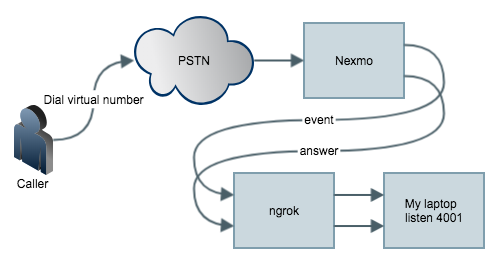
The target is When anyone (from PSTN/GSM) calls your virtual number, Nexmo platform intercepts the call andsends it to the application you created.
To setup a web server on your laptop to listen the webhook, you can use any web framework.
For me i use CodeIgniter . Download and unzip it anywhere.
Create a controller named event.php under application/controller with the following
defined('BASEPATH') OR exit('No direct script access allowed');
class event extends CI_Controller
{
public function index()
{
var_dump($_POST);
}
}
and a answer.php like the following,
defined('BASEPATH') OR exit('No direct script access allowed');
class answer extends CI_Controller
{
public function index()
{
var_dump($_POST);
}
}
Then under the same folder, run
>php -S localhost:4001 -t ./
will start a web server listening on port 4001.
Then we setup a ngrok which is an auto registering dynamic https endpoint.
On a macOS laptop, use
>brew cask install ngrok
>ngrok http 4001
For example, you see the following:
ngrok by @inconshreveable (Ctrl+C to quit)
Session Status online
Session Expires 7 hours, 59 minutes
Version 2.2.8
Region United States (us)
Web Interface http://127.0.0.1:4040
Forwarding http://e69a8532.ngrok.io -> localhost:4001
Forwarding https://e69a8532.ngrok.io -> localhost:4001
Connections ttl opn rt1 rt5 p50 p90
0 0 0.00 0.00 0.00 0.00
Now everything is ready on your laptop.
Then we tell Nexmo to send webhook to https://e69a8532.ngrok.io
# Install nexmo command line interface
>npm install nexmo-cli -g
>npm i npm to update
>nexmo setup
Find your application id on the page.
>nexmo app:update "My First App" https://e69a8532.ngrok.io/answer https://e69a8532.ngrok.io/event
>nexmo link:app
# Testing
Call the virtual number like +628557467xxxx from your mobile phone (GSM) or Skype outand you'll see the variable dumped in php.
[Thu Jul 26 16:41:55 2018] ::1:65010 [200]: /event
[Thu Jul 26 16:41:55 2018] ::1:65011 [200]: /event
[Thu Jul 26 16:41:56 2018] ::1:65012 [200]: /event
[Thu Jul 26 16:41:56 2018] ::1:65013 [200]: /event
[Thu Jul 26 16:42:12 2018] ::1:65017 [200]: /event
[Thu Jul 26 16:42:12 2018] ::1:65015 [200]: /event
[Thu Jul 26 16:42:13 2018] ::1:65016 [200]: /answer?to=628557467xxxx&from=4434xxxxxxxxxx&conversation_uuid=CON-xxxxxxxx-7a9e-426d-961b-828bc7726d49&uuid=93b62d17c960c0209xxxxxxxxxx
12/04/2017
Block incoming calls. How to extract offline database from Whoscall

Prepare apk and root phone

4/25/2017
Scaled Agile for The Enterprise
2/25/2016
架設公司私有的Yum repository for CentOS 7

11/05/2015
The End of HP Public cloud

Public cloud is an important part of our customers’ hybrid cloud strategy, and what they tell us is that they want the ability to seamlessly bring together multiple public cloud environments, from AWS to Azure to Google to Alibaba, under a single hybrid cloud model. So, we will be evolving our strategy in public cloud to ensure that we can deliver this to our customers. We will sunset the HP Helion Public Cloud offering on January 31, 2016 and will move to an open, multiple partner-based model for providing these important capabilities to our customers through our private and managed cloud offerings.
To support this new model, we will continue to aggressively grow our partner ecosystem and integrate different public cloud environments. We are helping customers build cloud-portable applications based on OpenStack code through the HP Helion Development Platform and our work in the Cloud Foundry community. In Europe, we are leading the Cloud28+ initiative that is bringing together commercial and public sector IT vendors and EU regulators to develop common cloud service offerings across 28 different countries.
For customers who want access to existing large scale public cloud providers, we have already added greater support for Amazon Web Services as part of our hybrid delivery with HP Helion Eucalyptus and support Office/365 and Azure.
11/04/2015
Apple在iOS 9強化安全的ATS措施 (App Transport Security)

如果你的App只會從你的服務網域下載資料, 請使用Exception Domains
以個別的方式加入例外, 記得your.domain是一個Dictionary, NSTemporaryExceptionAllowsInsecureHTTPLoads (NSExceptionAllowsInsecureHTTPLoads是錯誤的)和
NSIncludeSubDomains是Boolean如下圖:

請留意一下, Exception Domains是可以在Xcode內下拉選擇,
但是IncludesSubdomains前面要有NS開頭, 不信的話用其他編輯器打開Info.plist.
參考資料:
http://www.neglectedpotential.com/2015/06/working-with-apples-application-transport-security/
http://googleadsdeveloper.blogspot.tw/2015/08/handling-app-transport-security-in-ios-9.html
10/27/2015
Target 'AFNetworking' of project 'Pods' was rejected as an implicit dependency for 'libAFNetworking.a' because its architectures 'x86_64' didn't contain all required architectures 'i386 x86_64'
環境
Mac OS 10.10.5
XCode 7.1
iOS Project使用到AFNetworking, 透過CocoaPods安裝,
嘗試編譯時的出現警告:
現象


9/24/2015
Ansible結合Docker的使用方式
以現況來說,如果服務暫時無法移植到container執行, 要在私有雲上跑, 仍然需使用Ansible或是Chef或是Puppet這一類的工具。
目標
讓習慣Ansible的開發人員用原有的腳本在筆電上重複進行部署測試。
單純利用Docker的好處節省在開發機上安裝一堆VM (節省安裝OS的時間&空間)。
學習少量的Docker指令。
觀念
Ansible是從common role負責安裝所有的機器, 再由其他role安裝與設定其他各式Server。
Ansible需要為各種role撰寫playbook。
Docker的觀念是通過建立自己的base image 例如from Cent OS 7, 設置防火牆 VPN 與時區校正之後, commit, tag, 再從base image上安裝軟體變成各式Server。
用docker-compose以及links可以直接組裝許多Official images, 基本上只需要設計服務所需要的Application layer的images。
Docker需要為各種image撰寫Dockerfile。

假設我們需要1台空白機讓Ansible管理, 執行:
bash-3.2$ docker run -d shooding/docker-ubuntu-openssh
bash-3.2$ docker ps
你會看到1台機器(container)正在執行。
這裏我解釋一下參數
-d = daemon背景模式執行
shooding/docker-ubuntu-openssh 是我放在docker hub上面的image名稱
剛剛已經用docker開好1台機器(container), 一般會分成staging和production來區分環境。
現在是在筆電上進行測試, 使用staging
把container的資訊加入到~/staging
app-1 ansible_ssh_host=192.168.99.100 ansible_ssh_port=2222
[app_servers:vars]
ansible_connection=ssh
ansible_ssh_user=root
測試一下對於1台機器的連接狀況


8/11/2015
Lima開箱
Lima是一個讓你接上USB硬碟把它變成雲端化的一種技術。
首先先來一張三個顏色的疊疊樂。


- 測試用手機看電影
- 測試用3個Lima同時掛載在我的帳號下看發生什麼事情
5/29/2015
ZENLET 開箱


5/27/2015
小朋友保險研究
以下文章僅個人心得, 本網站之內容僅供參考之用,並未據此勸誘使用者採取任何行為,不構成對任何人在任何地區的投資建議、買賣之要約、勸誘買賣有價證券、金融產品或票券或參與任一特定的投資策略或任何其他意思表示,讀者不應視為專業意見而加以倚賴。任何人士或團體根據本網站所載任何資訊、意見或估計行事而直接或間接遭受的任何損失,概不作任何保證或承擔任何責任 */
醫療險:
實支實付如果只保1家不要選 (日額、實支2擇1的)。如果保2家組合, 則盡量選2擇1的, 這樣每一家都可以自由搭配。
理賠的項目有沒有全民健保以外的自費支出。(除看護外自費全部包括的概括式條款), 有概括式條款的較佳, 模糊解釋時從優解釋。
實支實付有沒有涵蓋高貴自費藥材?
壽險:
小孩14歲之前壽險額度都沒意義。任何時候小孩掛了我也不想領那種錢。14歲之後, 加公司團保定期壽險(為什麼這時候又要保? 因為實在便宜又大碗), 直到小朋友成年, 工作之後就要自己負擔, 因為這時候他的壽險額度是為了身後留下錢給另一半。
防癌、重大疾病:
(如果家族沒有遺傳病史)小朋友在防癌、重大疾病機率不高可以視自己經濟狀況投保, 用儲蓄準備金替代即可。小朋友成年之後請他自己投保防癌。
以下文章僅個人心得, 本網站之內容僅供參考之用,並未據此勸誘使用者採取任何行為,不構成對任何人在任何地區的投資建議、買賣之要約、勸誘買賣有價證券、金融產品或票券或參與任一特定的投資策略或任何其他意思表示,讀者不應視為專業意見而加以倚賴。任何人士或團體根據本網站所載任何資訊、意見或估計行事而直接或間接遭受的任何損失,概不作任何保證或承擔任何責任 */
5/21/2015
Mac OS X 安裝memcached for PHP

開發環境的安裝步驟
$brew install libmemcached
export PATH=/Applications/MAMP/bin/php/php5.6.2/bin/php:$PATH>flush_all
>quit